Version 1.3.0: teleported views always know where they are 🧭

react-native-teleport 1.3.0 is on its way. This release rewrites how Fabric measures teleported content: instead of keeping a pre-calculated offset in sync with the screen, a teleported Portal now looks up the position of its host directly in the shadow tree.
The result: measure() and Pressable keep working after you scroll, and a whole class of "stale position" bugs is gone for good!
🗺️ One view, two addresses
When you render something through a Portal, it lives in two places at once:
- in the React tree (and in Fabric's shadow tree, which mirrors it) it's still a child of the
Portal. This is what keeps context, state and props working; - on the screen (the native view hierarchy) it's a child of the
PortalHost. This is where it's actually drawn.
Most of the time nobody cares about this difference. But sometimes React Native asks: "where exactly on the screen is this view?". measure() asks it, and Pressable asks it all the time while you hold your finger on a button: if the finger moves too far away from the button, the press gets cancelled.
To answer this question Fabric walks up the shadow tree and adds up the positions of all parents. And in the shadow tree our button still sits inside the Portal, at its old place. So without any help Fabric points at the wrong spot.
🏠 The old way: "go to my old house and walk 3 blocks"
Since 1.1.10 (#150) we helped Fabric with a correction. The native side measured where the host and the source are on the screen and stored the difference between them (host − source) as an offset in the portal state. Fabric then calculated the position as:
position = Portal (shadow tree) + offset (native)
Think of it as directions like "go to my old house, then walk 3 blocks east". It works perfectly - as long as the old house doesn't move.
But it can! Declare a Portal inside a ScrollView and scroll it: the first part of the formula changes (Fabric knows about the scroll), while the second part stays the same (scrolling doesn't trigger any layout callback on the native side, so nobody recalculates the "3 blocks"). Now the answer is off by exactly the scroll distance, and Pressable cancels your press as soon as the finger moves a little (#220):
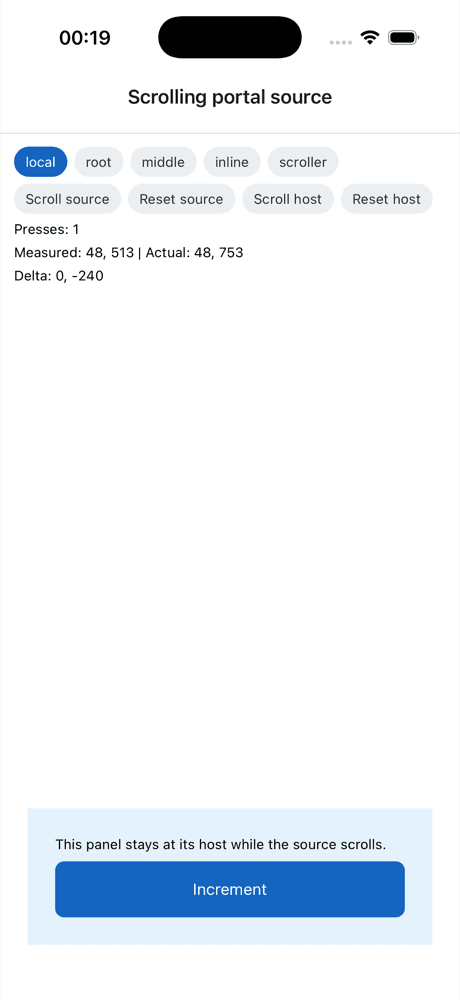 | 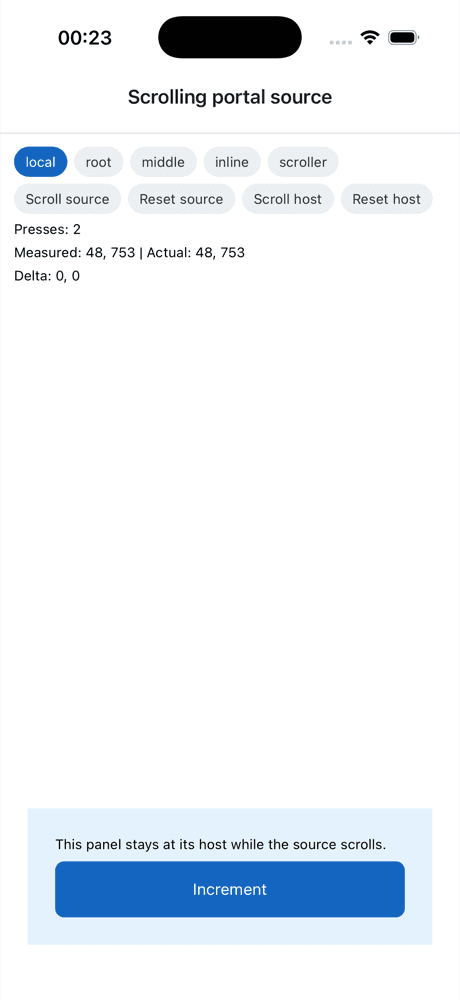 |
| 1.2.5: the measured position is off by the scroll distance (240), the second press is cancelled | 1.3.0: the measured position matches the actual one, the press is counted |
The two halves of the formula come from two different worlds that get updated at different moments. We had already fixed another case where these two parts drifted apart (#172), and every such fix meant one more native hook whose only job was to keep two numbers in sync. Recalculating the offset on every frame would have worked too, but then every teleported view would cost you work on every frame, even when nothing moves.
🧭 The new way: just ask where the host is
In 1.3.0 we stopped patching the formula and removed the source from it entirely.
A teleported Portal is now marked as a root node in the shadow tree (the RootNodeKind trait). This is the same trick React Native uses for <Modal> and react-native-screens uses for FullWindowOverlay - both have the same "lives here, drawn there" problem. When Fabric measures a view and reaches such a node, it stops walking up.
At that point the Portal tells Fabric where to continue from: the position of the host, read from the same revision of the shadow tree that is being measured.
position = host (shadow tree)
Back to the analogy: instead of "old house + 3 blocks" you now hand out the real address. Scroll the source, scroll the host, transform, rotate, re-layout - the answer is calculated at the moment of the question, from the data Fabric already has.
✨ Why it's better
- Nothing can get stale. There is no cached offset anymore, so there is nothing to keep in sync. Scrolling the source and scrolling the host are fixed by the same change.
- Nothing runs per frame. The position is calculated only when somebody asks for it.
- Less native code. The native side now reports only which host the children are mounted into and its size. The screen offset calculations and the layout and attachment hooks on iOS and Android are gone.
- One source of truth. Layout, transforms and scroll offsets of the host's ancestors are taken exactly as Fabric knows them. A new way of moving something on the screen is covered automatically, instead of waiting for its own bug report and its own fix.
On top of that, 1.3.0 removes a one-frame flash on Android when a Portal switches to another host (#228): the Portal now takes the size of the new host in the same commit that changes hostName, instead of drawing one frame with the layout of the previous host.
📦 Why 1.3.0 and not 1.2.6?
There are no API changes - your code stays exactly the same. But the way the library is linked into React Native has changed:
- to read the shadow tree the library now uses Fabric's
UIManager(throughShadowTreeRevisionProvider) andRuntimeScheduler. Everything it needs is available starting from React Native 0.78, so this is the new minimum supported version; - on iOS the library depends on more React Native pods. With
use_frameworks!and React Native built from source, the podspec now declaresReact-runtimescheduler,React-performancetimelineand (up to React Native 0.81)React-jsinspectortracingfor you.
Since this can affect your build, it deserves a minor version rather than a patch that you might pull in without noticing.
🚀 Upgrading
yarn add react-native-teleport@1.3.0
cd ios && pod install
If you are on React Native older than 0.78 - stay on 1.2.x until you upgrade React Native.
If you notice a wrong position, a cancelled press or a build issue after upgrading, please open an issue with your React Native version and a reproduction.